
Troubleshooting & Command Line Parameters
Log files for diagnosing connection issues, and command line startup options
Log Files
MODALIZER+ log files are stored in C:\Users\<User>\Documents\MODALIZERPLUS\LOGS. MODALIZER+ keeps the most recent log for every DICOM operation:
- LastEchoToStorageServer – Echo to PACS
- LastEchoToWorklistServer – Echo to Worklist Server
- LastMove – copying a study to PACS
- LastMPPSCreate – MPPS creation
- LastMPPSSet – setting MPPS status
- LastQuery – Query/Retrieve operations
- LastSend – send to PACS
- LastWorklistQuery – Worklist Server search
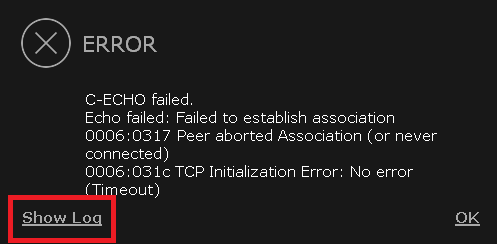
When an operation fails, MODALIZER+ shows an error message with an option to open the matching log file directly – the fastest way to see exactly what a PACS or Worklist server rejected.
Command Line Parameters
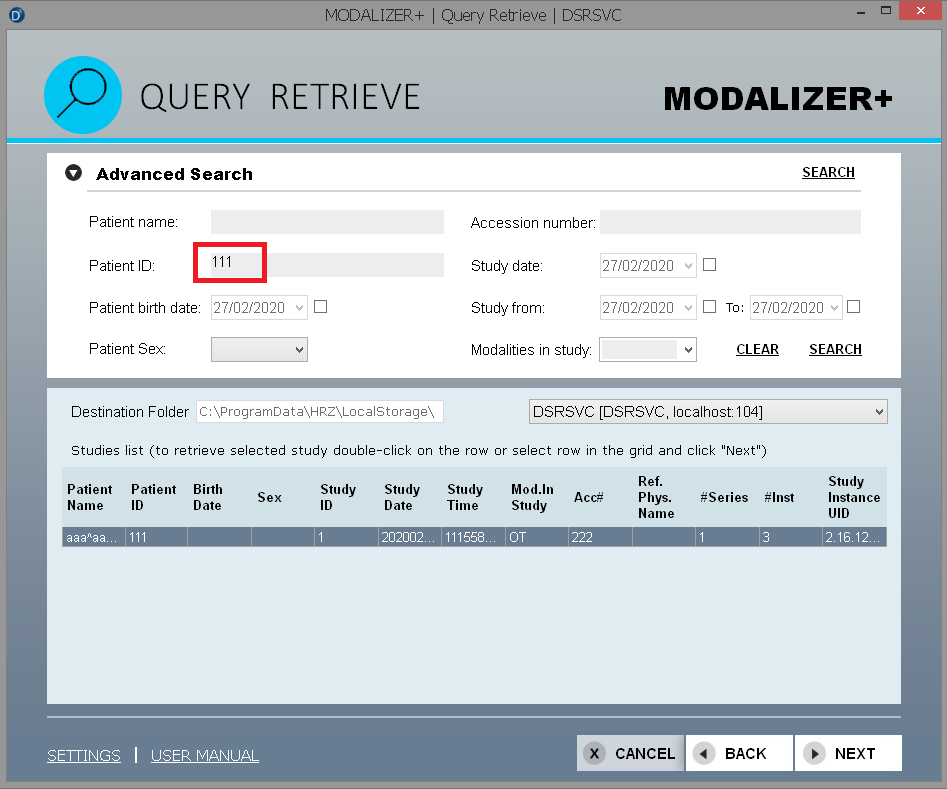
Launched with the right command line parameters, MODALIZER+ can start directly in the Query/Retrieve screen and run a query automatically – useful for scripted or kiosk-style workflows. Query parameters returned from PACS remain editable for further refinement. A separate parameter lets you save a snapshot of the image currently displayed in the viewer.
| Option | Description |
|---|---|
-q or -Q | Start MODALIZER+ in the Query/Retrieve screen and run a query. |
-o or -O | Set the output path for “Save as reference”. Overrides the EXAP shared folder. |
Query Parameters
Zero or more query parameters can follow the -Q option. Each parameter takes the form tagName="value" (double quotes are optional unless the value contains whitespace). Allowed tags are the same ones available on the Query/Retrieve screen, including Advanced Search, named per MODALIZER+’s DICOM tag enumeration:
| Option | Tag Name | DICOM Tag | Notes |
|---|---|---|---|
patientName | Patient Name | (0010,0010) | |
patientId | Patient ID | (0010,0020) | |
PatientBirthDate | Patient Birth Date | (0010,0030) | DICOM date format (YYYYMMDD), e.g. "20170821" |
PatientSex | Patient Sex | (0010,0040) | M/F/O or Male/Female/Other |
AccessionNumber | Accession Number | (0008,0050) | |
StudyDate | Study Date | (0008,0020) | Exact date, or a range: "-20170821" (up to date), "20170812" (from date), "20170812-20170911" (range). Use double quotes for ranges. |
ModalitiesInStudy | Modalities in Study | (0008,0061) |
Example: MODALIZERPlus.EXE -q patientId="111" starts directly in the Query/Retrieve screen and runs the query.
Save as Reference
When the -O parameter is used, a Save as reference button appears in place of the usual open-file/open-folder/history buttons. Clicking it saves the currently displayed and selected image, using its current VOI LUT, to the path given as the option’s value. For example, MODALIZERPlus.EXE -O "c:\taken Send as references" saves files into that folder.
The saved reference image is a full-resolution PNG (matching the DICOM Rows/Columns tags, (0028,0100) and (0028,0101)), saved alongside the original DICOM file, using the pattern:
<destination-folder>\SOP Instance UID.png<destination-folder>\SOP Instance UID.dcm
If -O isn’t set, MODALIZER+ falls back to the EXAP shared folder from Settings. If a file with the same name already exists at the destination, it’s replaced without prompting.
Start MODALIZER+ with -help or -h to open a popup listing every command line parameter.
← Previous: How-To Guides | Back to User Manual home →
DICOM is the registered trademark of the National Electrical Manufacturers Association for its standards publications relating to digital communications of medical information.